iPhone App Experience

Meet CENTMOND on iPhone.A dedicated landing page for the app itself.

This page is designed to introduce the iOS app with real product screens, cleaner storytelling, and a visual direction inspired by your reference.

Fast expense capture
Recurring reminders
Private and secure
CENTMOND splash screen

Product Tour

Built for every layer of your financial life

From category budgets to advisor insights, every screen is designed to feel direct, useful, and worth opening every day.

01

01 Overview Spotlight

Read the month in seconds

A calmer way to read the whole month.

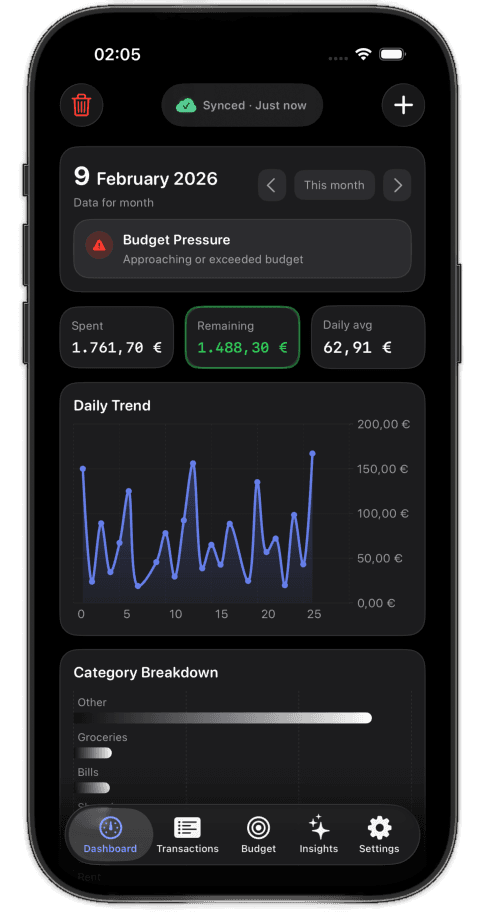
CENTMOND opens with the numbers that matter most: budget pressure, remaining balance, daily trend, and category context in one screen that feels readable immediately on iPhone.

This is the view that anchors the rest of the app. It gives the user a clean financial pulse before they dive into transactions, recurring payments, deeper charts, or advisor guidance.

Instead of making the user search through tabs first, the app starts with the exact signals that help them understand the month and decide what needs attention next.

Budget pressure at a glance
Remaining balance clarity
Daily trend with category context

Overview focus

Month first

The opening screen answers the first question immediately: where the month stands right now, before anything else.

01
Dashboard first
Dashboard overview screen
02

02 Category Budgets

Plan each category with precision

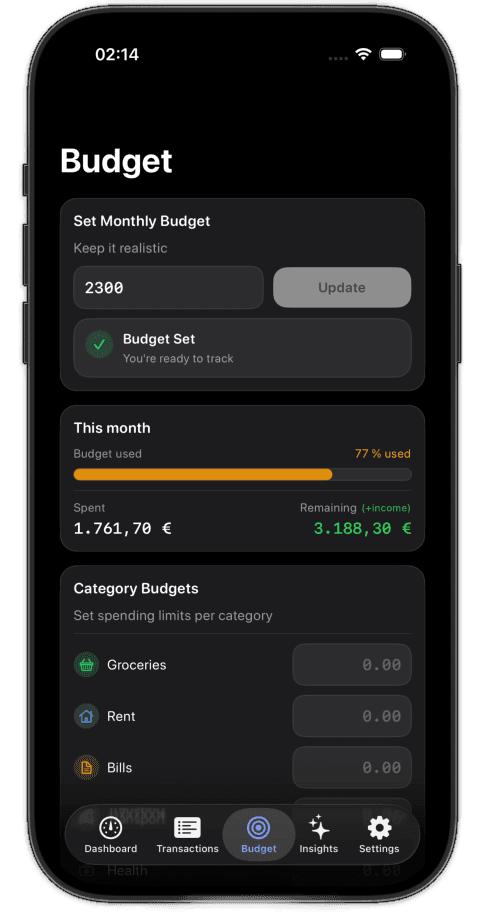
Budget by Category

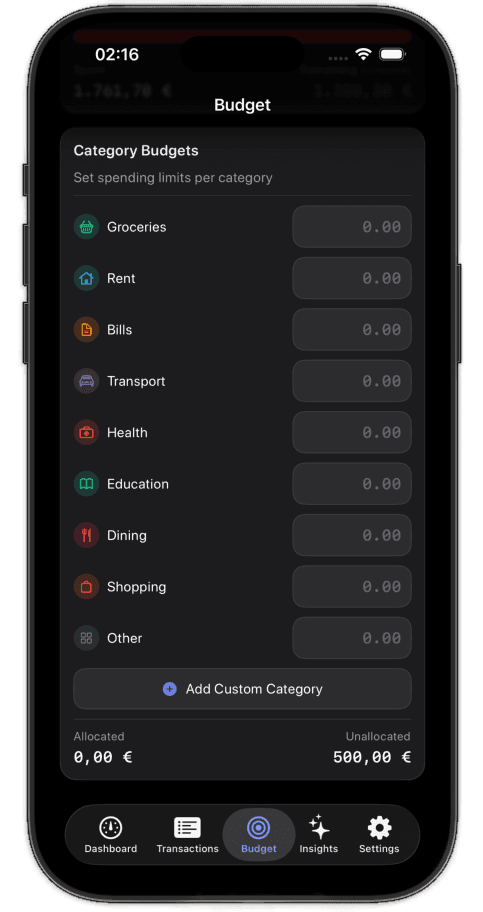
Set custom spending limits for each category and stay in control.

Create a plan that mirrors real life, not a generic spreadsheet. Give groceries, bills, dining, travel, or shopping their own limits and see exactly where pressure is building before the month slips away.

Instead of reacting after overspending, CENTMOND helps you set clear boundaries up front and monitor each category with a view that stays calm, visual, and easy to understand.

Custom caps per category
Early warning signals
Designed for monthly discipline

Budget groups

12+

Shape every category around the way you actually spend, not around a generic monthly template.

02
Custom limits
Category budgets screen
03

03 Advisor Insights

Guidance that adapts to your habits

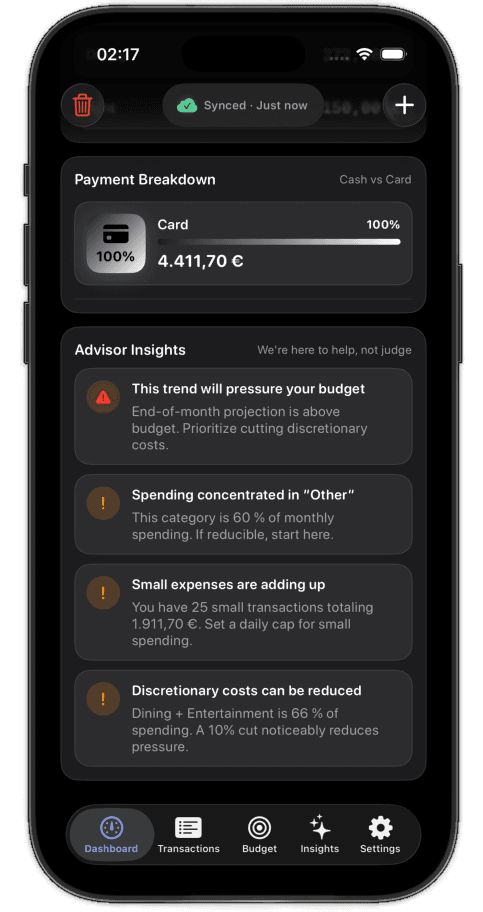
Your AI Financial Advisor

Get smart, personalized tips based on your real spending habits.

Static reports are not enough when your spending changes every week. The advisor translates your real transaction history into guidance you can actually act on, from tightening categories to spotting recurring waste.

It feels less like reading a dashboard and more like having a sharp financial second opinion built into the app, ready whenever you need direction.

Personalized suggestions
Habit-based guidance
Clear next-step prompts

Smart recommendations

AI-backed

Advice changes with your spending patterns, so the screen stays relevant instead of repetitive.

03
Behavior-based tips
Advisor insights screen
04

04 Recurring Transactions

Predict your fixed costs earlier

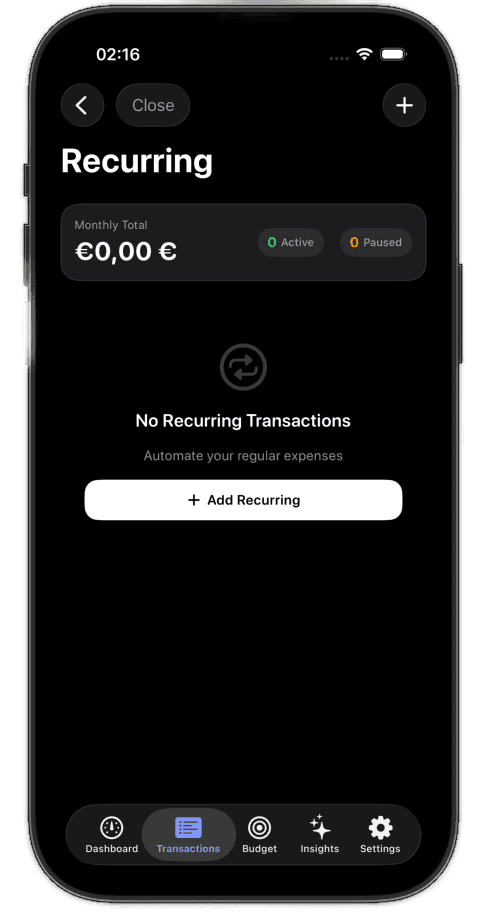
Automate Your Recurring Expenses

Track subscriptions and regular payments — never miss a bill again.

Monthly charges should not feel like hidden surprises. Recurring tracking gives every subscription, utility, and fixed payment a stable place in your routine so you always know what is coming next.

That means fewer missed renewals, cleaner monthly forecasts, and a budget that reflects your true fixed commitments before variable spending even begins.

Subscription visibility
Fixed-cost forecasting
Cleaner monthly planning

Recurring visibility

Always on

Build a clearer monthly baseline before flexible spending starts to distort the picture.

04
Bill-ready planning
Recurring transactions screen
05

05 Profile & Subscription

A cleaner control center for the account

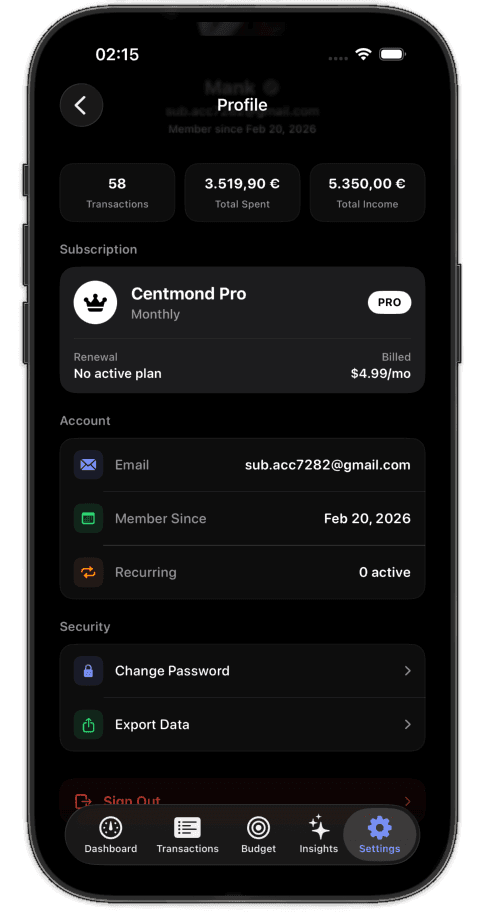
Your Account, Your Way

Manage your profile, subscription, and security all in one place.

Account settings should feel organized, not buried. From personal details to subscription status and security controls, the app keeps the operational side of your account clean, visible, and quick to update.

Everything important lives in one polished control center, so changing plans, reviewing access, or tightening security never turns into a hunt through menus.

Subscription controls
Security settings
Clean profile management

Account control

One place

Profile details, plan management, and protection settings stay together in a calmer layout.

05
Subscription control
Profile and subscription screen
06

06 Insights

Reports that drive real decisions

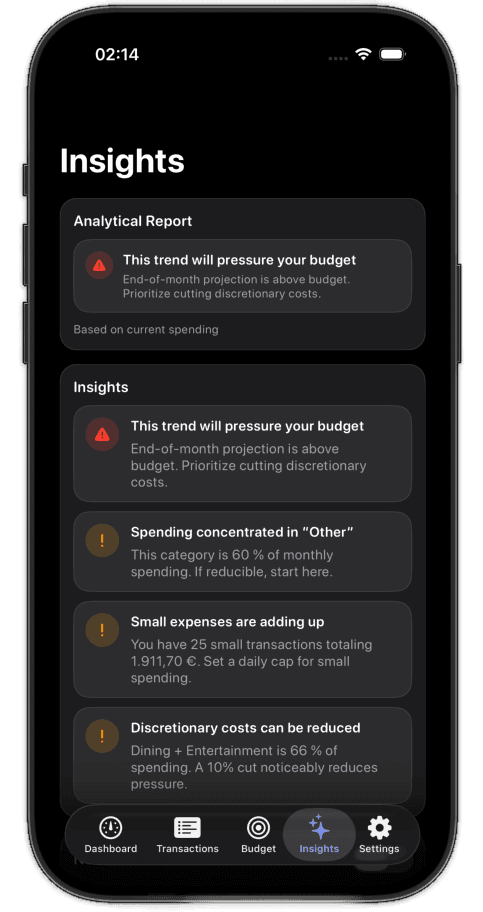
Insights That Actually Help

Actionable reports and alerts to keep your budget on track.

Insights matter only when they change decisions. This screen turns your activity into readable signals, highlighting where momentum is healthy, where categories are drifting, and where attention is needed next.

The result is a report layer that feels practical instead of academic, giving you enough context to adjust fast without overwhelming you with noise.

Readable alerts
Useful reporting
Decision-ready summaries

Less noise, more direction

Signal first

Designed to answer what matters now, without burying the user under unnecessary reporting clutter.

06
Action-ready reports
Insights screen
07

07 Add Transaction

Fast enough for everyday use

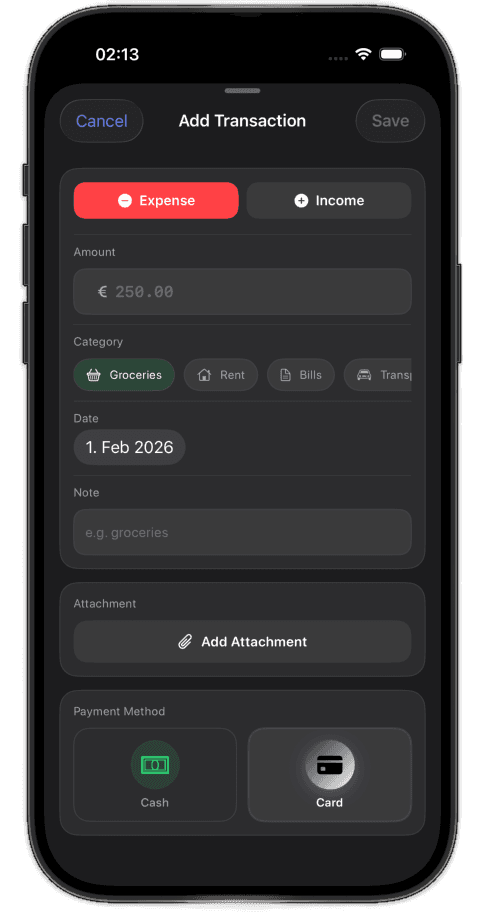
Add Expenses in Seconds

Log income or expenses with category, date, note, and attachments.

Capture needs to be frictionless or it simply does not happen. This flow is built for speed, letting you record expenses or income with the details that matter while keeping the interaction lightweight.

Categories, dates, notes, and attachments are all there when you need them, but the experience stays fast enough for everyday use on the move.

Fast manual entry
Notes and attachments
Built for real-world speed

Capture flow

Few taps

The interface stays lean enough for quick entry while still supporting detail when needed.

07
Quick capture
Add transaction screen
08

08 Category Breakdown

See where the month is drifting

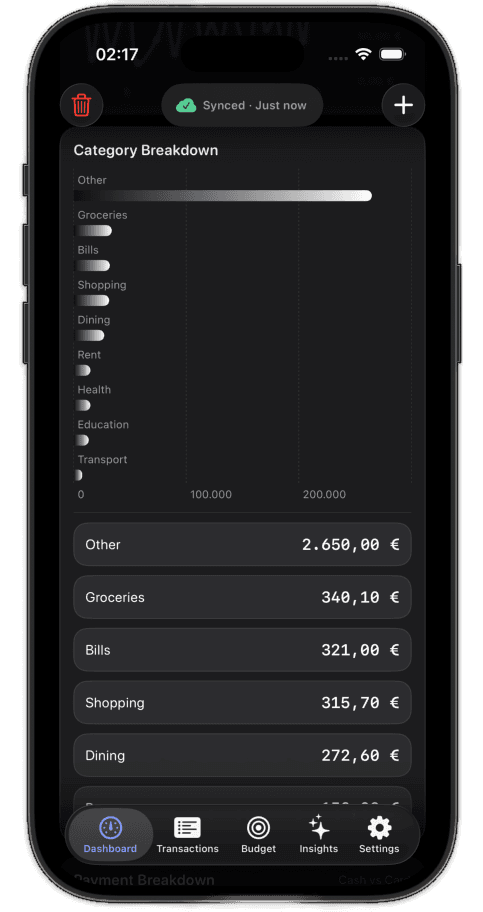
Know Where Every Euro Goes

Visual breakdown of spending by category — no surprises.

The fastest way to regain control is to see spending clearly. Category breakdown translates scattered transactions into a visual map of where your money is going and which areas are pulling hardest on your budget.

No guesswork, no hunting through raw lists. Just a direct picture of how the month is behaving and where you should focus next.

Visual spending map
Immediate category clarity
No hidden budget drift

Category pressure

Full view

A readable breakdown makes it easier to notice the patterns that usually stay hidden in transaction lists.

08
Spending map
Category breakdown screen
09

09 Export & Charts

Deeper analysis without leaving the app behind

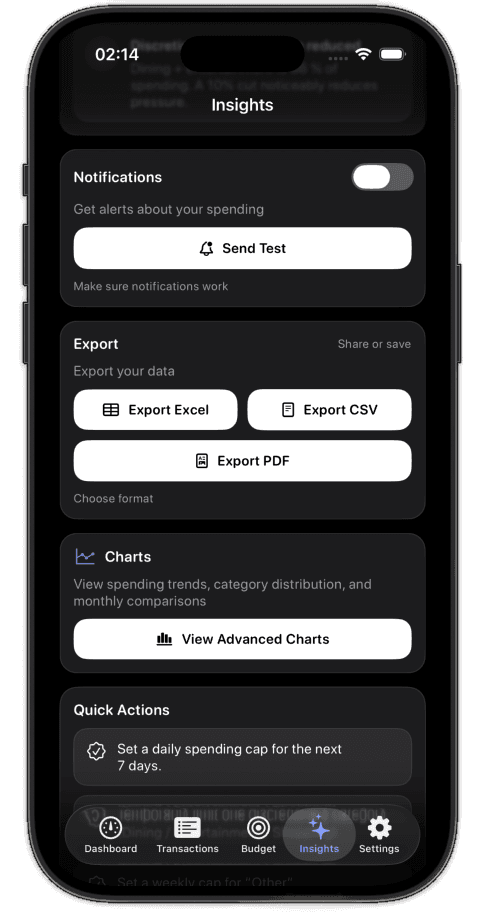
Export & Analyze Your Data

Download Excel, CSV, or PDF reports. View advanced charts anytime.

When you need deeper analysis, your data should move with you. Export gives you clean files for reporting, accounting, or personal review, while charts inside the app keep advanced visibility close at hand.

It is ideal for users who want both convenience on the phone and flexibility beyond it, without losing structure or context along the way.

Excel, CSV, and PDF
Advanced chart views
Built for serious review

Export flexibility

3 formats

Useful for accountants, planners, or anyone who wants to keep a deeper record outside the phone.

09
Portable reporting
Export and charts screen
10

10 Import CSV

Bring history with you on day one

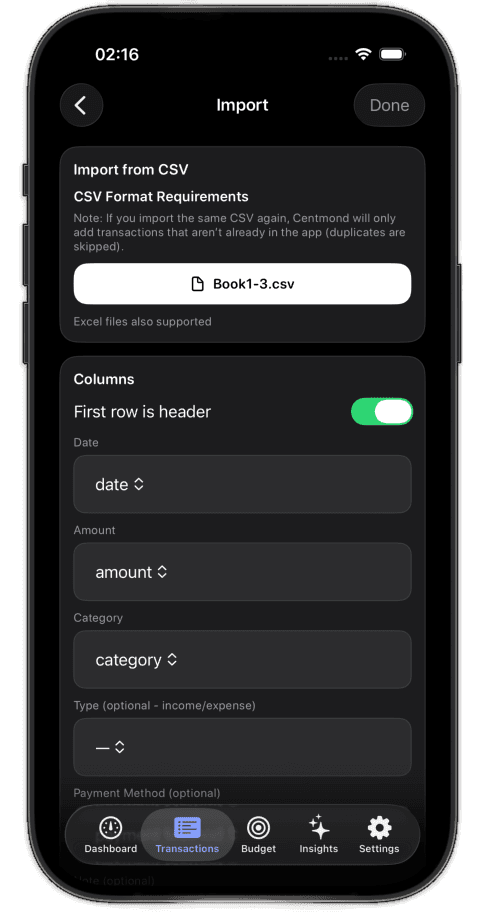
Import Your Data Easily

Bring your existing transactions from CSV or Excel — duplicates are skipped automatically.

Switching tools should not mean starting from zero. Import brings your existing history into CENTMOND quickly, helping you preserve context and move forward with a complete picture from day one.

Duplicate skipping keeps the migration clean, so you can onboard older data without manually cleaning every row before you begin.

CSV and Excel support
Duplicate protection
Fast migration into the app

Migration made cleaner

Zero restart

Historical data stays useful, so the app feels valuable immediately instead of months later.

10
Clean onboarding
Import CSV screen

Flow

A simple journey from check-in to control

The product flow moves from monthly clarity to fast capture and confident review, with a lighter composition that keeps the focus on the app itself.

01

Open your month

Start from a clear snapshot of income, spending, and category health.

02

Track spending fast

Capture transactions in a few taps with an interface tuned for one-handed use.

03

Review the patterns

Spot trends, categories, and recurring costs without digging through clutter.

04

Stay ahead of bills

Get timely reminders so subscriptions and fixed payments do not surprise you.

Add transaction workflow screen
Insights workflow screen
Budget overview workflow screen
Open your month
Review the patterns

Why This Page Works

A landing page tuned specifically for the iOS product

Native-feeling flow

Large touch targets, clear hierarchy, and a layout that feels at home on iPhone.

Prepared for real screenshots

The image slots are already structured, so your actual app shots can drop in later without redesign.

Focused messaging

This page is built specifically to present the iOS app instead of repeating the main website copy.